What Is Base64 Encoding (and When to Use It)?
A clear explanation of Base64 — what it does, why it exists, the everyday places it shows up, why it is not encryption, and how to encode and decode it.

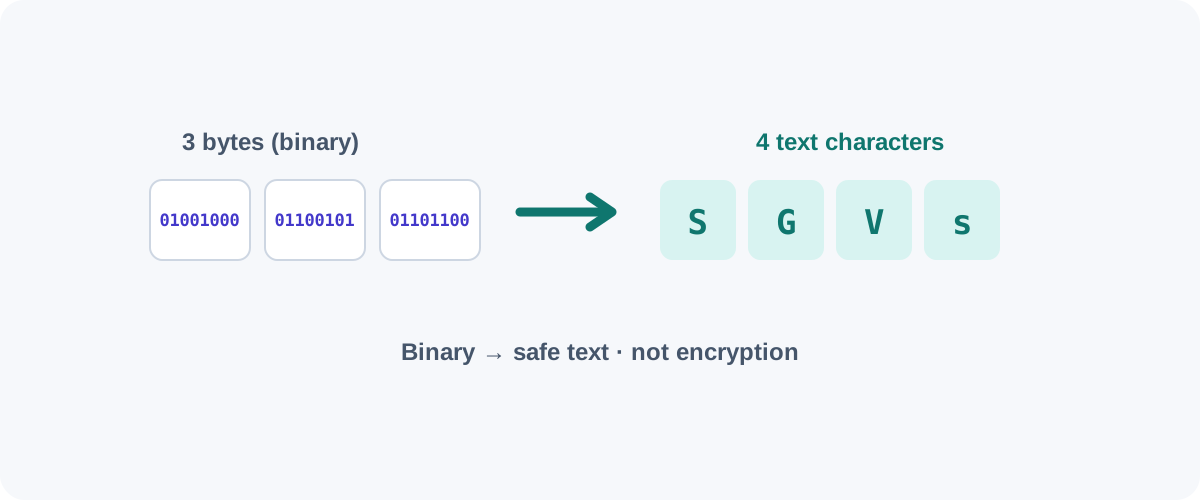
You’ve probably seen it: a wall of seemingly random letters, numbers, +, /, and trailing = signs, often labeled “base64.” It looks cryptic, but Base64 is simple and genuinely useful once you know what it’s for. Here’s the plain-English version.
What Base64 does
Computers store everything — images, files, anything — as binary (raw bytes). But many systems were built to handle only text: email bodies, URLs, JSON, HTML. Push raw binary through them and bytes get corrupted or misinterpreted.
Base64 solves this by re-expressing binary data using 64 safe text characters (A–Z, a–z, 0–9, plus + and /). The result is plain text that survives any text-only channel intact, and can be decoded back to the exact original bytes on the other end.
The core idea in one line
Base64 turns binary into text so it can travel safely, then back into the identical binary at the destination. Nothing is lost; nothing is hidden.
Why it makes data ~33% bigger
Base64 takes every 3 bytes of input and represents them as 4 text characters. Four-thirds is about a 33% size increase. That’s the price of compatibility — you trade some size for the guarantee that the data passes through text systems unharmed. The = you often see at the end is padding, used when the input length isn’t a clean multiple of three.
Where you’ll actually meet it
- Data URIs — small images, icons, or fonts embedded directly in HTML/CSS:
url(data:image/png;base64,iVBORw0...). Saves a separate network request for tiny assets. - Email attachments (MIME) — email was designed for text, so attachments are Base64-encoded to ride along.
- JSON / XML payloads — when an API needs to include binary (an image, a file) inside a text format.
- HTTP Basic Auth — the
Authorizationheader encodesusername:passwordas Base64 (which is exactly why Basic Auth must only be used over HTTPS — see the warning below). - Tokens and keys — often displayed in Base64 for safe copying (not for protection).
The crucial point: it’s NOT encryption
Base64 provides zero security
Encoding is not encryption. Base64 hides nothing — anyone can decode it instantly with no key. Never use it to protect passwords, API keys, or personal data. When you see credentials in a Base64 HTTP Basic Auth header, the only thing protecting them is the HTTPS connection, not the encoding. If you need actual secrecy, use real encryption.
A helpful way to remember it: Base64 is like writing a message in a different alphabet, not locking it in a safe. The information is fully readable to anyone who knows the (public, universal) alphabet.
How to encode and decode
Command line (built into macOS and Linux):
# Encode
echo -n "Hello, Utills" | base64
# → SGVsbG8sIFV0aWxscw==

# Decode
echo "SGVsbG8sIFV0aWxscw==" | base64 --decode
# → Hello, Utills
In the browser console (for ASCII text):
btoa("Hello")          // encode → "SGVsbG8="
atob("SGVsbG8=")       // decode → "Hello"
Note btoa/atob only handle Latin-1 cleanly; for Unicode text you encode via TextEncoder first. For quick one-offs, a Base64 encoder/decoder tool is the fastest path — paste, convert, copy.
URL-safe Base64
Standard Base64 uses + and /, which have special meanings in URLs. So a URL-safe variant swaps them for - and _ and often drops the = padding. If a string won’t decode normally but contains - or _, it’s likely this variant — most decoders have a toggle for it.
In short
Base64 is a translator, not a lock. It makes binary data safe to send through text-only systems at the cost of about a third more size. Reach for it to embed small assets, move binary through JSON, or read an auth header — and never, ever, mistake it for security.
Frequently asked questions
Is Base64 encryption?
No, and this is the most important thing to understand. Base64 is encoding, not encryption — it scrambles nothing and provides zero security. Anyone can decode it back to the original in a second. Never use Base64 to "hide" passwords, tokens, or sensitive data; it only changes the representation, not the secrecy.
Why does Base64 make data bigger?
Because it represents every 3 bytes of input using 4 text characters, Base64 output is about 33% larger than the original. That's the cost of making binary data safe to travel through text-only channels. It's a size trade-off you accept for compatibility, not an efficiency gain.
What is Base64 actually used for?
Embedding small images or fonts directly in HTML/CSS as data URIs, attaching files in email (MIME), carrying binary data inside JSON or XML, and encoding credentials in HTTP Basic Auth headers. Anywhere binary data must pass through something that only reliably handles text.
How do I decode a Base64 string?
On the command line, echo the string into `base64 --decode`. In a browser console, use atob() for ASCII text. Or paste it into a Base64 decoder tool. If it doesn't decode to something sensible, it may be a variant (like URL-safe Base64) or not Base64 at all.